What you can use today
Systainer Cabinet Designer
Plan a Systainer wall sized to the tool cases you own, and take it all the way to a cut list. Free 7-day trial, no card needed.
Cabinet Designer
The full kitchen and cabinet designer is still in beta while we finish it.
How it works
One workflow, three steps.
Each step hands its work to the next, so you never re-type a dimension. Follow the path, or open any tool on its own.
Design
Lay out your cabinets with a live elevation, and watch the cut list build itself as you size them.
Open the Designer → Closed beta - opens per accountMaterials
Set your sheets, edgebanding and hardwoods once, and every tool sizes its parts to exactly what you stock.
Open the Materials Library →Cut
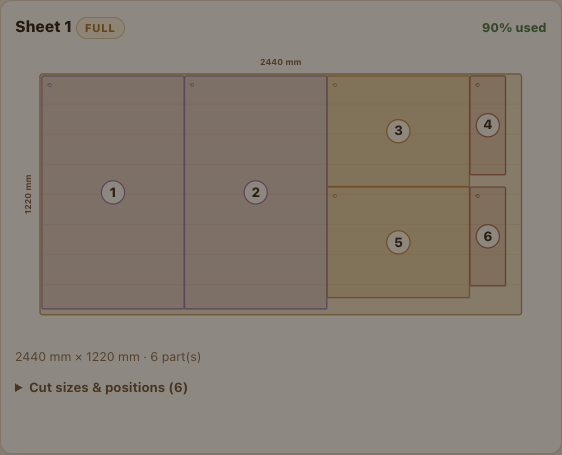
Nest every part onto your sheets and offcuts, with grain matching, saw kerf and edgebanding already taken out.
Open the Cut List Optimizer →Good to know: what you can open today is listed above. The Cut List Optimizer, the Systainer Cabinet Designer, and Shop Details keep your work in the cloud, so they ask you to sign in first. The Materials Library works right in your browser with no account.
Every other tool lives in the Tools button at the top of this page: the hinge and Gola calculators, the Systainer Cabinet Designer, the cost calculator, the photo-to-parts tool and the hardware library. The build and install guides are here.
Guides and help
Built in · early preview
New here? Let the AI Designer guide you.
CabDesign is growing into a platform where you can plan a whole kitchen just by describing it. The first piece is live now: a built-in AI Designer that knows every tool in the studio and, once you sign in, reads your saved design.
Ask it what a part should measure, how to set something up, or what to do next, in plain English.
This is release one. It grows with every update.
Meet the AI Designer →Pricing
Free to start. Built to grow with the shop.
Most of the studio runs free in your browser with no account at all. A free account starts a 7-day trial of the project tools. After that it is $19 a month for unlimited projects, or $49 once for a single project.
Free trial
For any shop, any bench.
7 days, no credit card
- Sign in with Google in about 30 seconds
- The Systainer Cabinet Designer, Cut List Optimizer, materials and hardware libraries, all unlocked
- The AI Designer assistant, in early preview
- Your materials catalog synced across devices (it works with no account too, on one device)
Unlimited
For anyone who keeps building.
Unlimited projects. Cancel any time.
- Every member tool, unlimited projects
- Everything in the trial, kept
- Your projects saved and synced across devices
- New capabilities as they ship
The full kitchen Cabinet Designer is not part of the plans above. CabDesign is moving to three plans of its own - DIY at $29 a month, Pro at $89 a month, and Enterprise at $229 a month - all coming soon. Until they open, the Designer stays in closed beta - ask for access.
Most calculators, both libraries and all the guides need no account at all (see the FAQ below). Planning just one project with the tools above? A one-time $49 purchase covers a single project, no subscription needed.
Questions
The short answers.
Do I need an account to use it? +
Mostly no. The Materials Library works with no account: open it on this device right away, and sign in later to save your work to the cloud. Three tools keep everything on your account, so they ask you to sign in first: the Cut List Optimizer, the Systainer Cabinet Designer and the Hardware Library. The AI Designer also needs a sign-in, so it can read your saved design. Sign-in is free, with Google or email, in about 30 seconds, and every new account starts a free 7-day trial. Everything else, the calculators, the Gola and hinge tools, the photo tool and all the guides, works right away with no account. The full kitchen Cabinet Designer is in closed beta, so it is access by request for now.
What is the AI Designer? +
An assistant built into the Designer page. It knows every tool in CabDesign, and once you sign in it can read your saved design, so you can ask it questions in plain English: what a part should measure, how to set something up, or what to do next. It is an early preview today, and it grows with every release toward planning the whole job with you.
Where does my work live? +
Projects from the signed-in tools are saved to your account in the cloud: sign in on any device and your work is there. The free calculators keep their settings in your browser, on the machine you used them on. After the free 7-day trial, it is $19 a month for unlimited projects, or a one-time $49 purchase for a single project.
Does it handle saw kerf and edgebanding? +
Yes. The optimizer deducts the saw kerf between parts and the edgebanding thickness from each edgebanded edge, so the size on the cutting diagram is the size you actually cut.
What is grain matching? +
When a row of doors should read as one continuous piece of timber, you group them and the optimizer keeps them on one board, in the order they sit on the cabinet face. You set the columns and stacking order, or drag them to match.
Is it for frameless or face-frame? +
It is built around European frameless (32mm) and Gola handleless cabinets, the way the studio builds. The cut list and optimizer work for any panel parts you give them.
Design a cabinet. Choose your materials. Cut it.
Free account. No install. It runs in your browser.